

Scan options
What scan depth, speed, verification, patch, severity, and reuse settings mean.
Scan options affect analysis intensity, follow-on work, and the fixed price. Nebu refreshes the quote as relevant choices change. Available options can depend on the repository plan and account configuration.
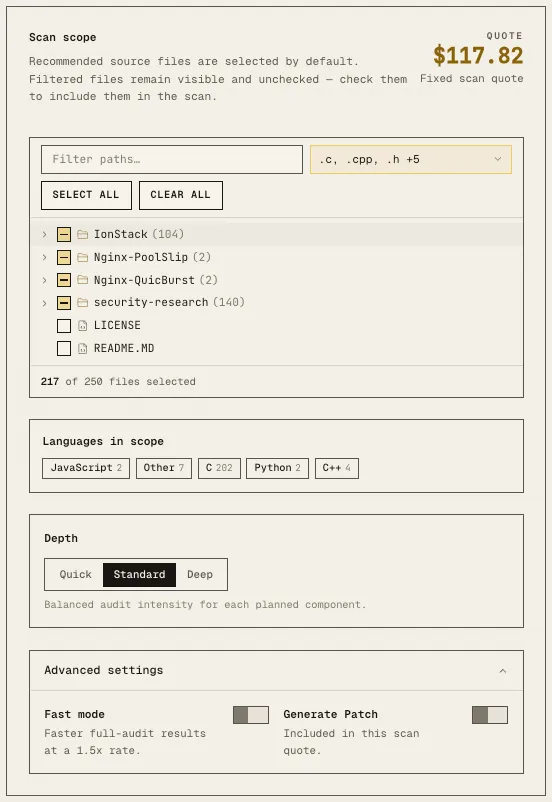
Depth
| Depth | Meaning | Tradeoff |
|---|---|---|
| Quick | Fast audit intensity for each planned component. | Lightest cost and shortest expected run. |
| Standard | Balanced audit intensity for each planned component. | Default choice for general-purpose scanning. |
| Deep | Highest audit intensity for hidden bugs. | Slowest and highest cost; plan availability may apply. |
Smart Scan always uses Standard depth and does not show the Depth control.
Fast mode
Fast mode returns full-audit results sooner. For full audits, the interface displays a 1.5 times rate. PR review and Diff Scan enable it by default and use the standard review rate.
Use it when turnaround time matters and the displayed fixed price is acceptable.
Dynamic Verification
Dynamic Verification attempts to reproduce findings with proof-of-concept behavior in an isolated environment. It provides stronger exploitability evidence before a finding is reported. The fixed quote includes this work.
Set a minimum severity to control which findings receive dynamic verification.
Generate Patch
Generate Patch produces a proposed code fix after a finding is verified. The fixed quote includes the patch work.
Set a minimum severity to limit patch generation. Review every generated patch before applying it or opening a pull request.
Severity threshold
A severity threshold applies the selected follow-on action to findings at that severity and every more severe level:
- All includes every severity.
- Medium and above includes Medium, High, and Critical.
- High and above includes High and Critical.
- Critical only is the narrowest choice.
Reuse previous scans
When Nebu finds compatible artifacts from an earlier scan, it can skip components that were already analyzed with matching settings.
- Keep reuse enabled for a faster, more efficient scan.
- Choose Force full rescan only when every component must be analyzed again.
Options that depend on the workflow
- PR review requires a repository connected through the GitHub App and an open pull request.
- Automatic pull request creation requires the GitHub App and generated patches.
- Smart Scan fixes depth at Standard.
- Multi-repository scans do not support PR review, Diff Scan, custom threat modeling, or Dynamic Verification.
Before you launch
Review the complete scope, every enabled option, and the refreshed fixed quote. If the quote expires or any option changes, request and review a new quote before launching.
