

Projects and repositories
How Nebu organizes repositories, scans, findings, and team access.
Nebu organizes source code in two levels: Projects contain Repositories.
What is a project?
A project is the top-level workspace for an application, product, service group, or team. It groups:
- repositories that belong to the same system or ownership boundary;
- the scans and findings created from those repositories; and
- the people who can access that work.
Use separate projects when repositories have different owners, access requirements, billing boundaries, or unrelated security goals.
What is a repository?
A repository is one connected or uploaded source code target inside a project. Nebu can receive it through the GitHub App, a public Git URL, or a zip upload.
A repository has its own source connection, tracked revision, preparation status, scan history, and automation defaults. The same project can contain several repositories, such as a web application, API, and worker.
How the hierarchy works
Project├── Repository│ └── Scan│ └── Findings└── Repository └── Scan └── FindingsA single-repository scan targets one repository. A multi-repository scan can target two or more Ready repositories, but every selected repository must belong to the same project.
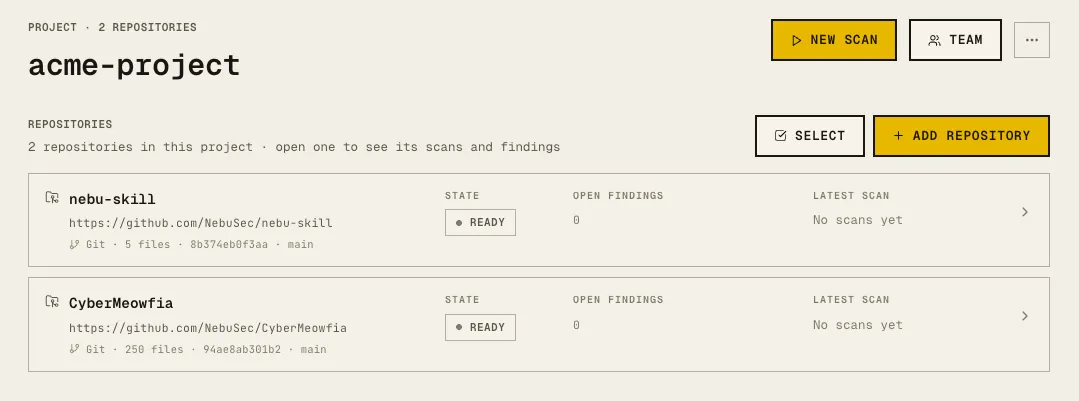
Repository status
A repository must have a prepared source snapshot before it can be selected for a scan. If it is still preparing, failed, was cancelled, or has no ready snapshot, wait for preparation to finish or repair the connection first.
Naming guidance
- Name projects after the system or team, not a single repository.
- Keep repository names aligned with the connected source so people can recognize them.
- Avoid putting secrets, customer data, or environment credentials in either name.
